Gridlocked: Traffic Control1.2.1
Publisher Description
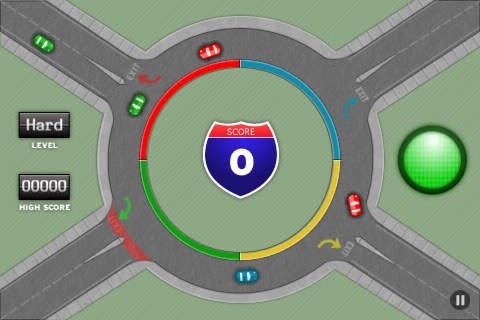
Gridlocked: Traffic Control is back, with great new features!
You asked for new maps, and we listened. New to Gridlocked: Traffic Control are two brand new maps - Town Square and Roundabout.
Gridlocked still features the gameplay you know and love, but with a brand new twist. On our Roundabout map, cars can crash into each other ending the game, so get ready for new strategies and more fun!
We've also added a lot of improvements behind the scenes, so your game will run faster and smoother than ever before.
With online scoring, 3 difficulty levels, and expanded statistics, Gridlocked: Traffic Control is still guaranteed to please casual and serious gamers alike.
ALL VERSIONS:
Ever wish that you could control traffic? In this fast-paced, addictive strategy game you can! Your job is simple. Quickly change the lights of 6 major intersections to allow cars to cross without backing up, and watch out for emergency vehicles which must cross in 15 seconds or less. Clear the intersections of honking drivers and police cars, or it's game over!
Think you have what it takes to make our online leaderboard? Challenge yourself and your friends to beat our best scores, and see how long you can rule the Gridlocked Scoreboard.
FEATURES:
- Engaging gameplay you can enjoy for minutes or hours
- Simple, polished graphics
- Compare your scores to the rest of the world with our online leader board
- Restart your game after a phone call
Requires iOS 2.2.1 or later. Compatible with iPhone, iPad, and iPod touch.
About Gridlocked: Traffic Control
The company that develops Gridlocked: Traffic Control is A Tiny Tribe llc.. The latest version released by its developer is 1.2.1.
To install Gridlocked: Traffic Control on your iOS device, just click the green Continue To App button above to start the installation process. The app is listed on our website since 2009-05-05 and was downloaded 4 times. We have already checked if the download link is safe, however for your own protection we recommend that you scan the downloaded app with your antivirus. Your antivirus may detect the Gridlocked: Traffic Control as malware if the download link is broken.
How to install Gridlocked: Traffic Control on your iOS device:
- Click on the Continue To App button on our website. This will redirect you to the App Store.
- Once the Gridlocked: Traffic Control is shown in the iTunes listing of your iOS device, you can start its download and installation. Tap on the GET button to the right of the app to start downloading it.
- If you are not logged-in the iOS appstore app, you'll be prompted for your your Apple ID and/or password.
- After Gridlocked: Traffic Control is downloaded, you'll see an INSTALL button to the right. Tap on it to start the actual installation of the iOS app.
- Once installation is finished you can tap on the OPEN button to start it. Its icon will also be added to your device home screen.
